
Incidents · Procore Daily Log · OSHA logs
Enter it once.
Logged three ways.
An accident in Procore's Daily Log, an incident in Procore's Incidents tool, or a report from the phone: whichever comes first, LaunchPad Safety creates the other two. Nobody types it twice, and the case lands with your Safety team ready for the OSHA 301, 300 and 300A.
Works inside your own Procore · No double entry · Included on every plan
Illustration with sample data.
Three ways in, one record
Start wherever your people already work.
Accidents get recorded in different places on different jobs. Each one usually means someone re-typing it somewhere else, or a Safety manager finding out days later. Linked, every path ends in the same place.
- 1
Entered in the Daily Log
The superintendent adds an accident to the day's Daily Log, as they always have. LaunchPad Safety creates the private incident in Procore's Incidents tool and the case for your Safety team.
- 2
Entered in the Incidents tool
Someone records an injury or illness in Procore's Incidents tool. LaunchPad Safety adds the accident to that day's Daily Log and brings the person and injury details to your Safety team.
- 3
Reported from the phone
A foreman reports it from the LaunchPad Safety app in about a minute, in English or Spanish. It goes to the Incidents tool and the Daily Log at once.
In the app
From a Daily Log entry to the OSHA 301.
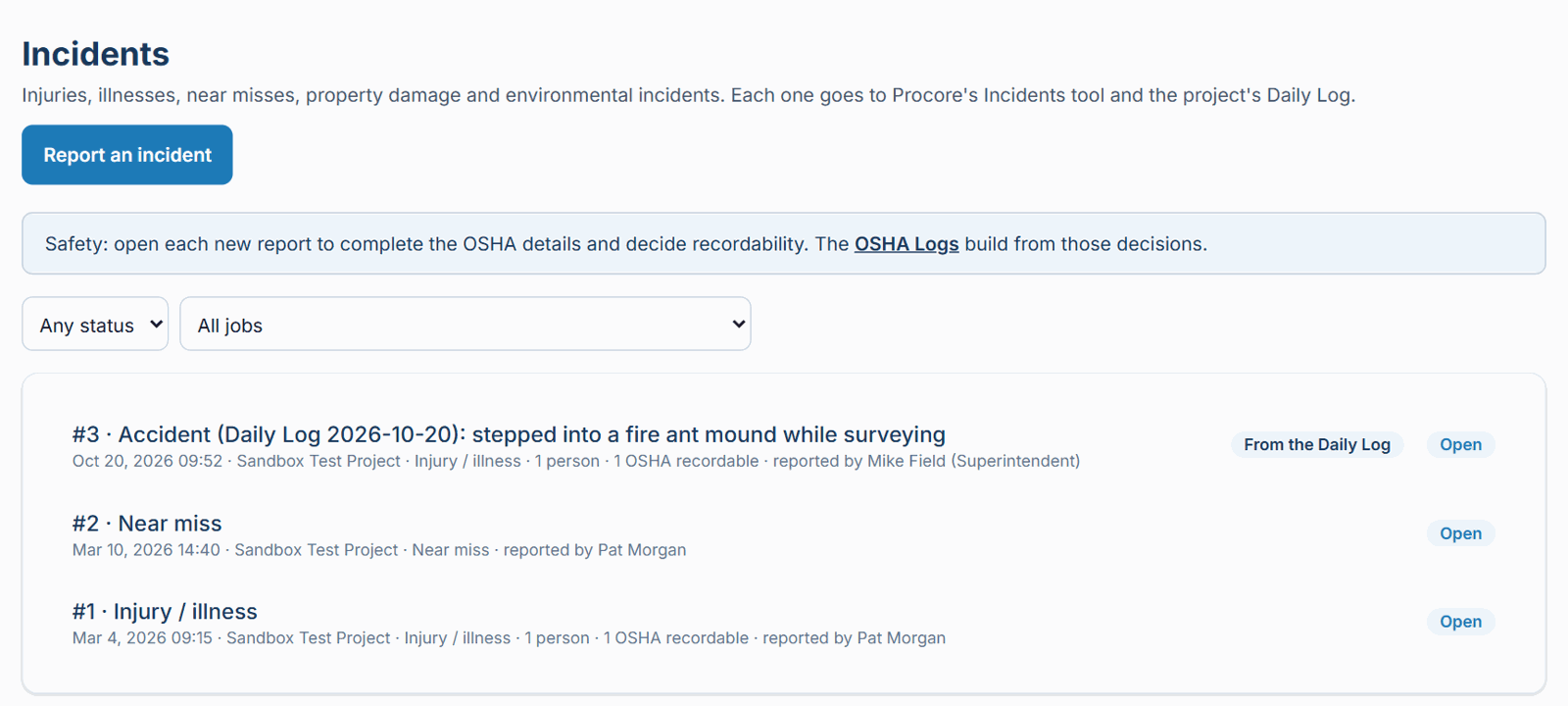
One accident, entered by a superintendent in the Daily Log. Everything below happened without anyone re-typing it.
It arrives on its own
The accident from the Daily Log is already in your Safety team's list, marked where it started and who entered it.
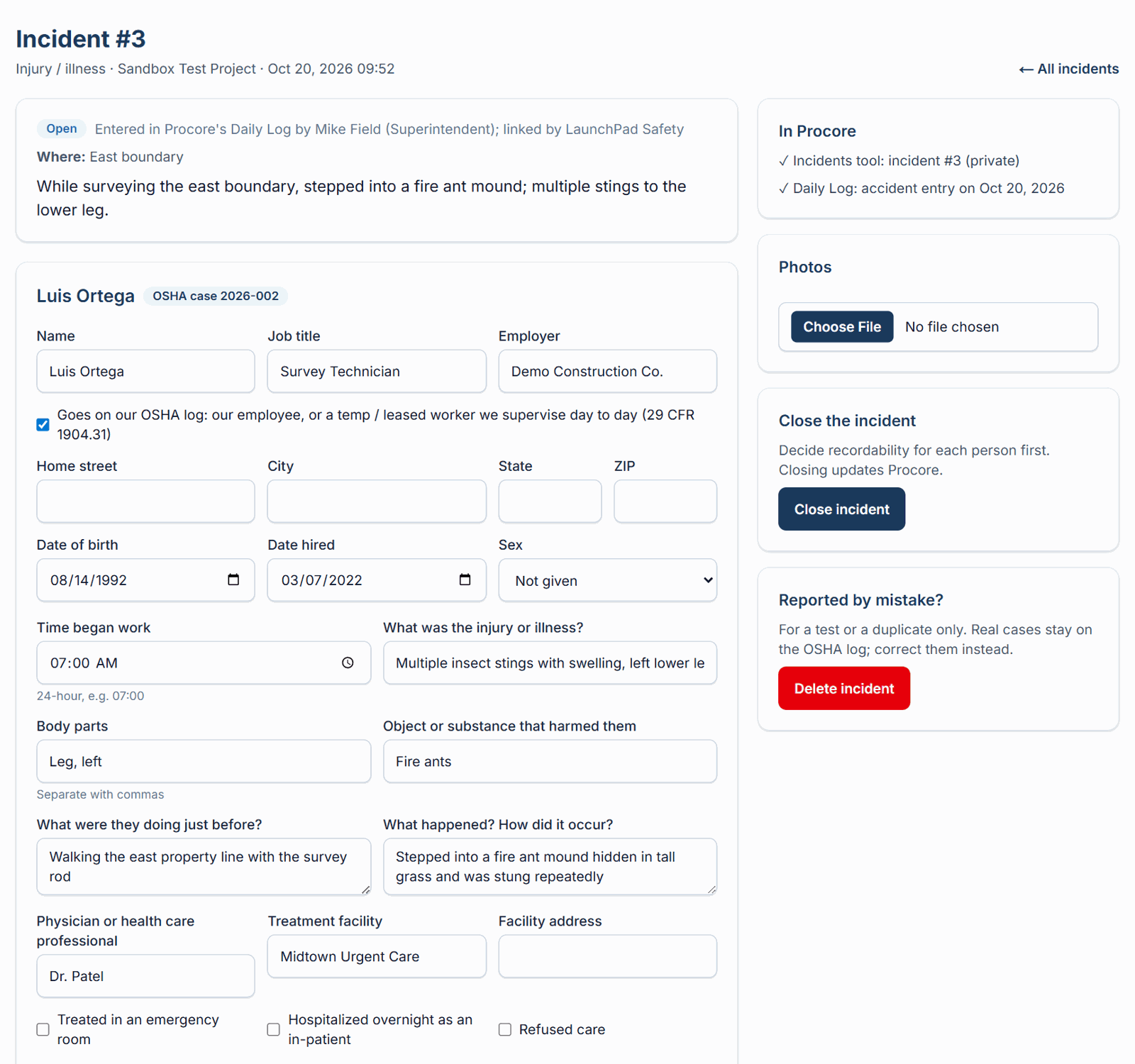
Safety completes the case
The name, company and what happened are filled in from Procore. Safety adds what OSHA needs and decides recordability with the 29 CFR 1904 rules on screen. Procore's injury record is updated to match.
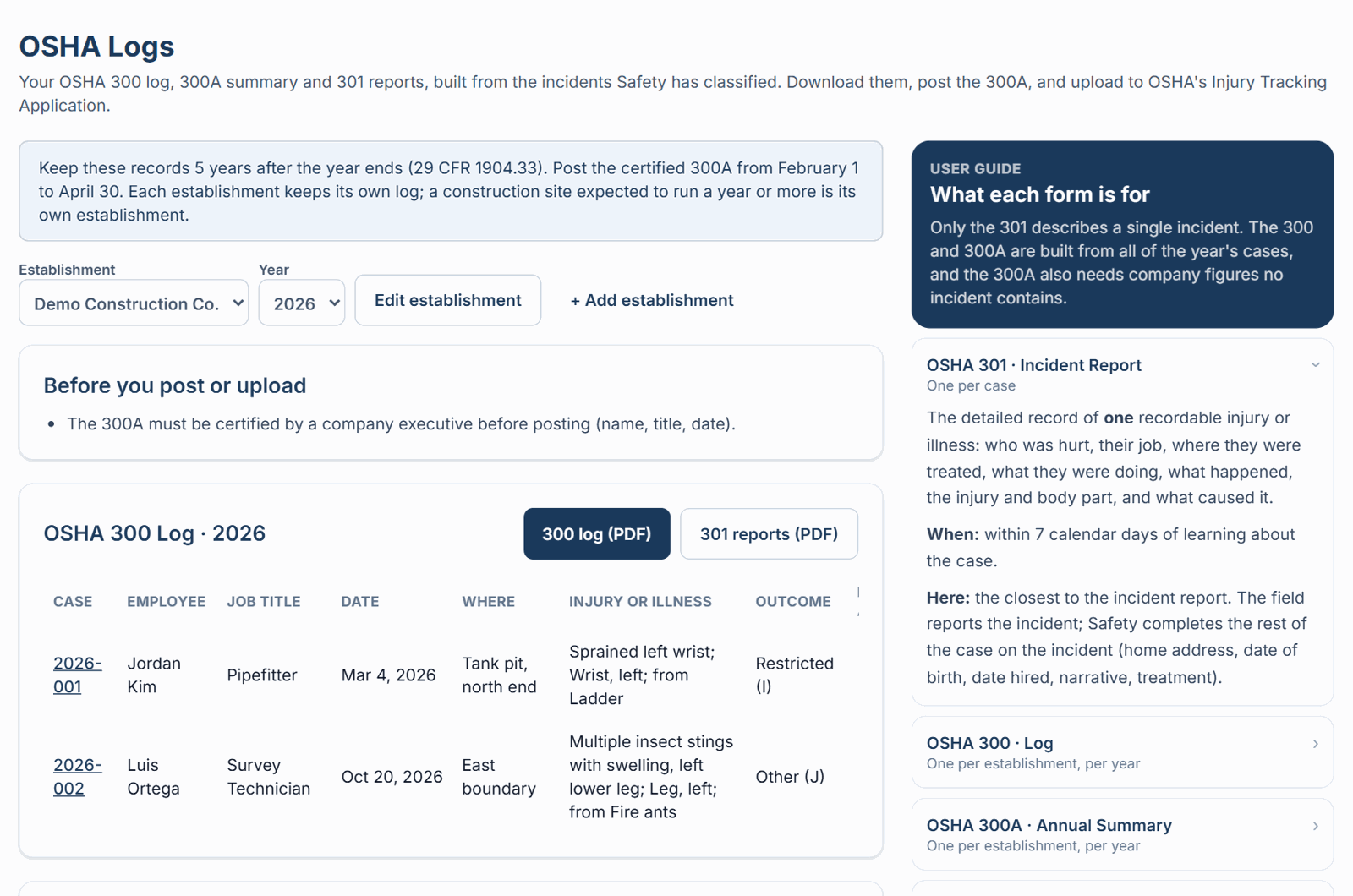
The forms fill themselves
The case goes on the OSHA 300 log, counts in the 300A summary and prints on its own 301 incident report.
Screens from LaunchPad Safety with sample data.
No double entry
The field records it once, wherever they already do.
Safety knows right away
Every accident reaches your Safety team within minutes, whoever entered it.
Nothing falls off the log
An accident in the Daily Log can't be missed when the OSHA 300 is built.
Private where it matters
The Procore incident carries no names; medical details stay with Safety.
Questions
Incident linking FAQ
+Does my superintendent have to change anything?
No. They keep entering accidents in the Daily Log, or incidents in Procore's Incidents tool, exactly as today. LaunchPad Safety does the rest.
+How do I turn it on?
Your LaunchPad Safety Administrator turns on "Link Procore Daily Log accidents and incidents" in Settings. It's off until then; when it's turned on, it also picks up entries from the 24 hours before.
+How quickly does it happen?
LaunchPad Safety checks your projects every few minutes. The matching entry and the Safety case usually appear within five minutes.
+Can it create duplicates?
No. Each pair is linked, so an entry is never created twice, and reports made in LaunchPad Safety (which already go to both Procore tools) are skipped.
+Who sees the injured person's name?
The Procore incident is private and carries no names. Names and medical details are visible in LaunchPad Safety only to your Administrator and Safety team. The Daily Log keeps what your superintendent wrote.
+What about near misses and property damage?
A near miss, property damage or environmental incident entered in Procore's Incidents tool comes to your Safety team too. Only injuries and illnesses add an accident entry to the Daily Log.
+If someone edits the entry later, does the other side change?
No. Linking creates the matching entry once. Later edits are made where they belong; Safety's decisions in LaunchPad Safety update Procore's injury record.
+Is it included in our plan?
Yes. Incident linking, incident reporting and the OSHA logs are included on every LaunchPad Safety plan.
Stop typing accidents twice.
Incident linking comes with every LaunchPad Safety plan, alongside inspections, corrective actions, site sign-in and OSHA logs.