
The Terms of Service, and accepting a new version
Where to read the Terms, who accepts them for your company, and what to do when a new version needs accepting.
The Terms of Service are the agreement between your company and LaunchPad. They are accepted once for the whole company, by an Administrator.
Read the Terms
- On the website: safety.launch-pad-core.com/terms (and the Privacy Policy at /privacy), linked at the bottom of every page.
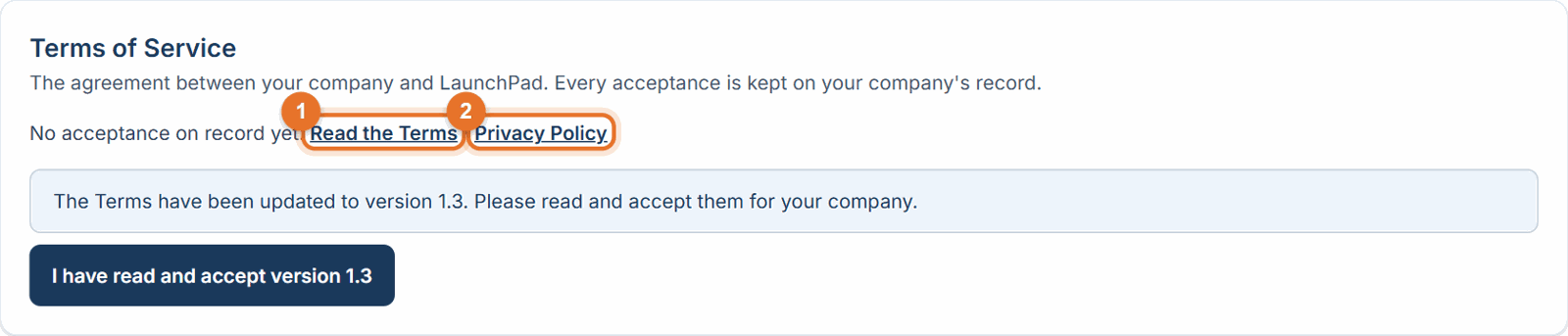
- In the app: Settings → Terms of Service shows which version your company accepted, who accepted it and when, with links to Read the Terms and the Privacy Policy.
When the Terms change
- Administrators see a yellow banner at the top of the app: "The Terms of Service have been updated. Please review and accept them for your company."
- Click Review and accept, read the new version, then click I have read and accept version … in Settings → Terms of Service.
Before you start
- Only an Administrator can accept. Other people don't see the banner, and their work isn't interrupted.
- The person who signs up the company accepts the Terms during sign-up.
Good to know
- Every acceptance is kept on your company's record: who accepted, which version, a fingerprint of the exact text, the date and time.
- Changes to the Privacy Policy don't need acceptance; they're published at /privacy with their effective date.
- Material changes take effect no sooner than 30 days after notice, and you may cancel before then.
Still stuck? Call or text (888) 207-2330 or email support@launch-pad-core.com.