
Build a JSA / JHA with the agent, start to finish
Have the agent draft a Job Safety Analysis for a task, review and approve it, and use it with the crew on site.
The agent breaks a task into its steps and, for each step, lists the hazards, a risk rating and the controls, plus the PPE and permits the task needs. Every hazard shows the regulation or company rule behind it. You review and approve it; your crews then use it on site, and each crew review is recorded in your Procore. The JSA / JHA library comes with Pro II (and with the free trial).
Before you start
- You need to be the Administrator, Safety Personnel or a Project Administrator to draft and approve.
- Use the website to draft. Crews review a JSA on site on the phone app (or the website).
- Optional but recommended: confirm your company safety manual and add your company rules first. See How the agent chooses the rule.
1. Draft it
- Open ✦ Agent Builder in the menu and choose JSA / JHA. (You can also draft from the JSAs / JHAs tab of the Safety library.)
- In Which task?, describe the task the way your crew would, with the details that matter: depth, height, equipment, materials, site conditions. For example: "Excavate and set a 12,000 gallon underground fuel tank, trench about 14 ft deep, excavator and 40-ton crane, operating station with two dispensers open."
- Add anything else the agent should know (optional), and a photo of the work if you have one. The agent looks at the photo when listing hazards.
- Click Draft with the agent. In about a minute the draft opens.
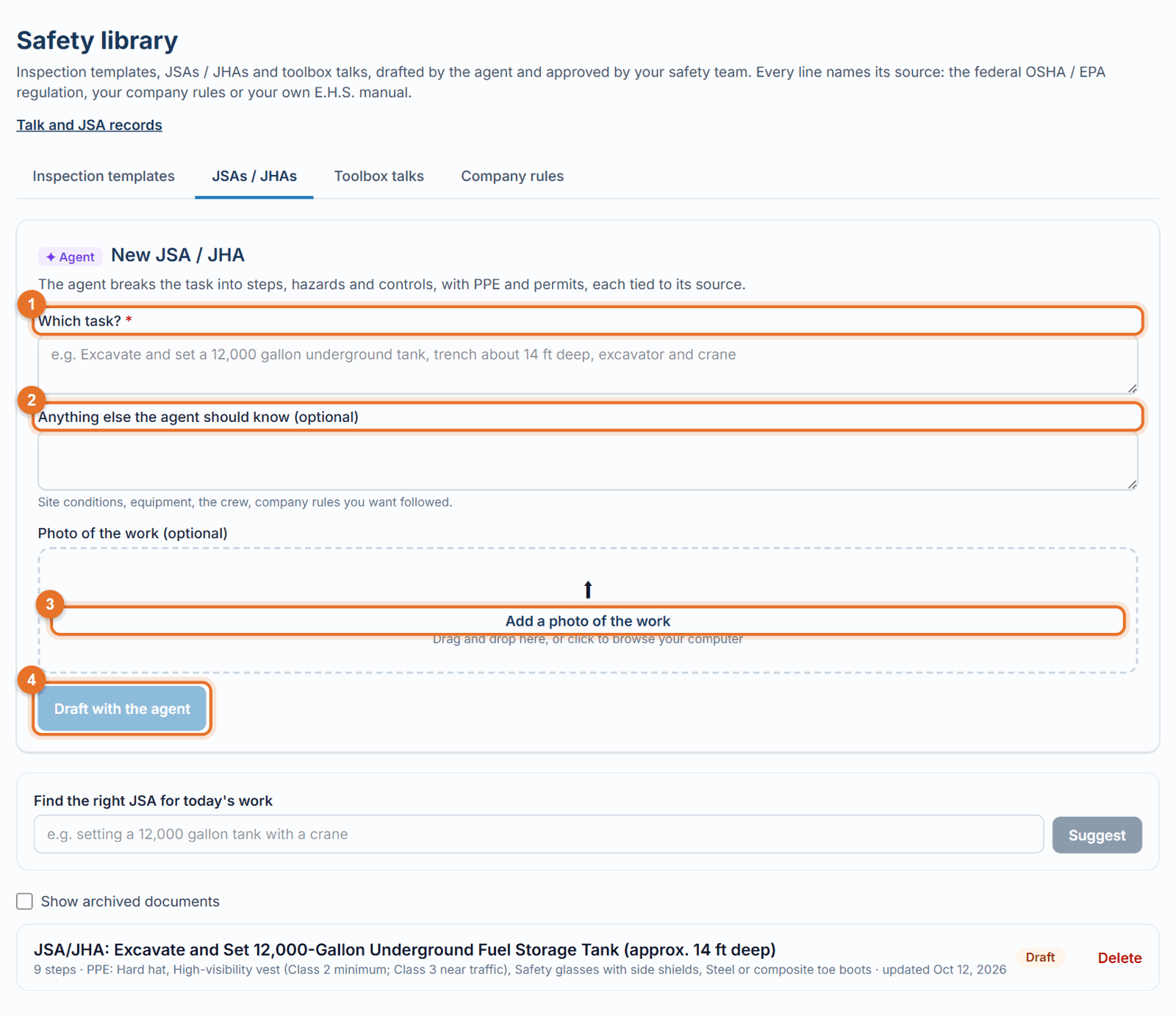
2. What you get
- Steps: the task in order, usually 4 to 10 steps.
- For each step: the hazards, a High / Medium / Low risk rating, and controls in the right order: engineering first, then administrative, then PPE.
- PPE and Permits for the whole task (for example hot work, confined space, lockout, excavation, crane lift).
- Sources under each hazard: the regulation sections, your company rules, and quotes from your manual.
- ✦ Notes for the reviewer: assumptions to confirm, and anything the agent couldn't cite.
For fuel-system work (tanks, dispensers, product lines, tanker deliveries) the agent also covers ignition control, atmospheric testing, bonding and grounding, spill prevention, the emergency shutoff, traffic control, confined space, excavation near tanks, lockout of dispensers and pumps, and benzene, and may name industry standards such as API RP 1604.
3. Review, correct and approve it
- Read every step as if you were the foreman. Is the order right? Is a hazard missing for your site?
- Use Comments for the agent to change it ("Add a step for backfilling", "We use a trench box, not sloping"), or Edit to change wording yourself. See Revise a draft.
- Add photos of the right way to do a step if they help the crew.
- Click Approve. Only approved JSAs are offered to crews.
4. Use it on site
- On the phone, the crew lead opens Toolbox Talks & JSAs and picks the JSA, or describes today's work and lets the app suggest the right JSA.
- They go through it with the crew, then record the review with attendance and finger signatures.
- The review is saved as a record in LaunchPad Safety and in the project's Procore Inspections, with a PDF.
See Review a JSA with the crew.
Good to know
- Publishing a JSA to Procore (optional) creates a company inspection template named "JSA · …" in your Procore.
- A JSA is a planning tool for your competent person; the agent supports them and doesn't replace them.
- To change an approved JSA, edit it and click Save and approve, so crews keep an approved version; an agent revision goes back to Draft until someone approves it.