
Draft a template, JSA or toolbox talk with the agent
Ask the agent for a first draft of an inspection template, JSA / JHA or toolbox talk, and understand its sources and notes.
The agent writes a complete first draft in about a minute, from a short description (and, for a JSA, an optional photo of the work). It is a draft: a competent person must review, edit and approve it before the team relies on it. Administrators, Safety Personnel and Project Administrators can draft.
Before you start
- Open Safety library on the website. Drafting is not available in the phone app.
- Your plan must include the type (templates on every plan, toolbox talks with Pro I and Pro II, JSAs with Pro II).
Steps
- Open ✦ Agent Builder and pick Inspection template, JSA / JHA or Toolbox talk, or use the matching tab in the Safety library.
-
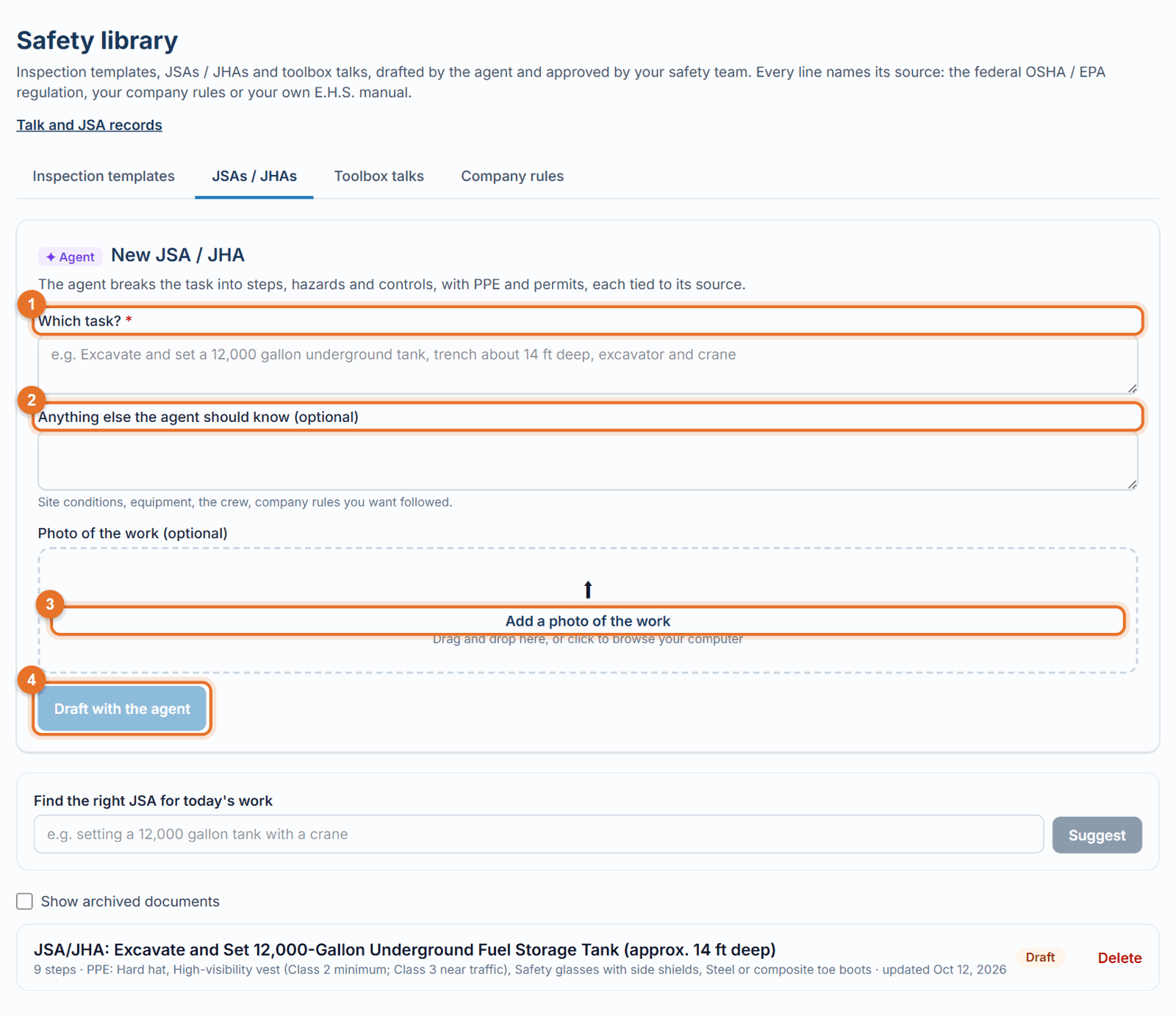
Describe what you need in the first box. Be specific about the work, for example:
- Template: "Weekly fuel island and dispenser area inspection for our service crews"
- JSA: "Excavate and set a 12,000 gallon underground tank, trench about 14 ft deep, excavator and crane"
- Talk: "Ladder safety: choosing, inspecting and setting up portable ladders" 3. Add anything else the agent should know (optional): site conditions, equipment, the crew, company rules you want followed. 4. For a JSA, add a photo of the work (optional). The agent looks at it when listing hazards. 5. Click Draft with the agent. You'll see "The agent is drafting…"; it takes about a minute. The draft then opens.
What you get
- Inspection template: 3 to 8 sections, 20 to 60 items, each written as something you can answer Acceptable / Unacceptable / N/A by looking at the site.
- JSA / JHA: the task broken into steps (usually 4 to 10); for each step the hazards, a High / Medium / Low risk rating, and controls (engineering first, then administrative, then PPE); plus the PPE and permits the task needs.
- Toolbox talk: about 5 minutes spoken, in English and natural Spanish, with a short real-world example, pauses that ask the crew a question, 3 to 5 key points, and 3 to 4 check questions with answers in both languages.
Sources and citations
- Every item, hazard or talk lists its sources under it:
- federal regulation sections (for example 29 CFR 1926.652(a)), taken from the official eCFR text;
- your company rules (for example "Company rule CR-3");
- quotes from your own E.H.S. manual, with the page, once your manual is confirmed.
- The page header shows which sources were used ("Sources: federal OSHA / EPA regulations + company rules + …").
- Where your company rule or manual is stricter than the regulation, the draft applies the stricter one and says so.
- For fuel-system work (tanks, dispensers, tankers) the agent may also name industry standards such as PEI RP1700 or NFPA 30A. It names them only; it never quotes them.
- The agent can only cite sections it was given. It never invents a regulation number, and it never calls a condition "safe".
Notes for the reviewer
Above the document you may see ✦ Notes for the reviewer: assumptions it made, things to confirm, and places where your company may want a stricter rule. These notes are for the reviewer only; they are not part of the document the crew sees.
If something goes wrong
- "The agent could not do this right now (…). Try again.": a temporary problem; try again in a minute.
- "The result was too long. Narrow the request and try again.": split it, for example one JSA per task.
- "The agent declined this request. Rephrase it as a safety task or topic.": describe the work or topic plainly.
Good to know
- Drafts are saved as Draft and are only visible to Administrators, Safety Personnel and Project Administrators until approved.
- Next: revise it, then approve it.
Still stuck? Call or text (888) 207-2330 or email support@launch-pad-core.com.