
Report an incident
Report an injury, illness, near miss, property damage or environmental incident from the website or the phone, and see where it goes in Procore.
Anyone in your company can report an incident: Superintendents, foremen, Project Managers, Subcontractor Leads, Safety. Report what you know now; Safety follows up for the rest. Get medical help first. Call 911 for anything serious.
Report it
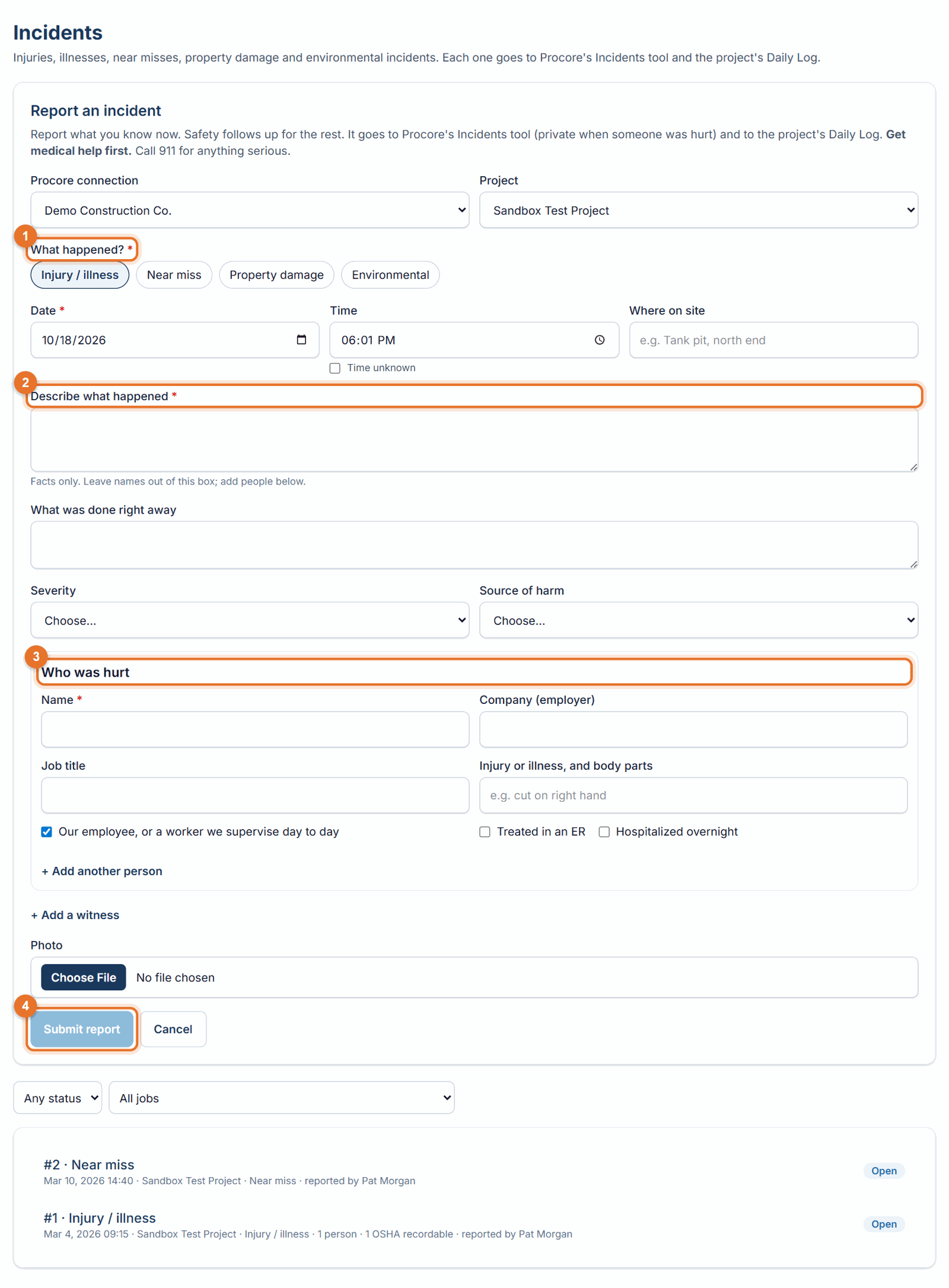
- Website: open Incidents in the menu and click Report an incident. Phone: choose the project on the Home screen, then tap Report an incident.
- Pick what happened. Choose one or more: Injury / illness, Near miss, Property damage, Environmental.
- When and where. The date and time fill in with now; change them if needed, or tick Time unknown. Add where on site.
- Describe what happened. Facts only, and keep names out of this box (people go in their own section).
- Who was hurt (injuries): the name, their company, the injury and body part, and whether they were treated in an emergency room or hospitalized overnight. Add more people if needed.
- Add witnesses and a photo if you have them, then Submit report.
Where it goes
- Procore Incidents tool: a full incident with its records (injury, near miss, property damage, environmental). When someone was hurt it is private, and it never includes names; those stay in LaunchPad Safety.
- Procore Daily Log: an Accident entry on that day, with the time, the person and company involved, and a short description. A case Safety marks as a privacy case leaves the name off.
- LaunchPad Safety: the incident appears under Incidents with its number (#1, #2…) and status.
If Procore can't be reached, the report is still saved. The incident shows Procore update pending, and anyone can click Try Procore again on it.
Accidents entered in Procore
If your field team enters accidents directly in Procore, the Administrator can turn on Settings → Accidents and incidents in Procore → Link Procore Daily Log accidents and incidents. From then on, checked every few minutes: - An accident entered in a project's Daily Log creates a private incident in Procore's Incidents tool (no names), and it appears under Incidents here marked From the Daily Log for Safety to complete. - An injury or illness entered in Procore's Incidents tool creates that day's Daily Log accident entry, and it appears here marked From Procore Incidents, with the person and injury from Procore. - Reports made in LaunchPad Safety already create both, so nothing is created twice. Entries made from 24 hours before linking is turned on are picked up, and later edits aren't copied between the two.
What happens next
- Safety opens the incident, completes the details OSHA needs, and decides whether each injury is OSHA recordable. The status shows Needs Safety follow-up until they do. See OSHA logs.
- To get a hazard fixed, also raise a corrective action from a photo (Field, or Report a finding on the phone). See Corrective actions.
Good to know
- Only Administrators, Safety Personnel and Project Administrators see names and medical details. Everyone else sees that someone was hurt, but not who.
- With Limit people to their Procore projects on, people can report and see incidents only on their own projects.
- Photos must be JPEG or PNG, under 15 MB.
- Reports written in Spanish are recorded in English for the OSHA forms and Procore; Safety can see the original. See Use the app in Spanish.