
OSHA logs (300, 300A, 301) and completing an injury case
Complete each injury case, decide OSHA recordability, and download the OSHA 300 log, 300A summary, 301 reports and the OSHA upload files.
Your OSHA forms build themselves from the injuries Safety has classified. Only Administrators, Safety Personnel and Project Administrators can see this. LaunchPad Safety prepares the forms; your company remains responsible for the recordkeeping decisions (29 CFR Part 1904).
Complete an injury case
- Open Incidents and click the incident (new ones say Needs Safety follow-up).
- For each person, fill in what OSHA asks for on Form 301: job title, home address, date of birth, date hired, when they began work, what they were doing just before, what happened, the injury or illness and body parts, the object or substance, and the physician or facility.
- Under Recordability, tick what applies: Medical treatment beyond first aid, Lost consciousness, Significant diagnosed injury or illness, and enter days away and days of job transfer or restriction. The form shows a suggestion; you decide.
- Choose OSHA recordable?, the Outcome (Death, Days away, Job transfer or restriction, or Other recordable), and the Injury or illness type. Tick Privacy case when the rule applies (see below).
- Save case. A recordable case gets its number, such as 2026-001. Procore's injury record is updated with the matching filing type (Fatality, Lost time, Restricted work or Medically treated).
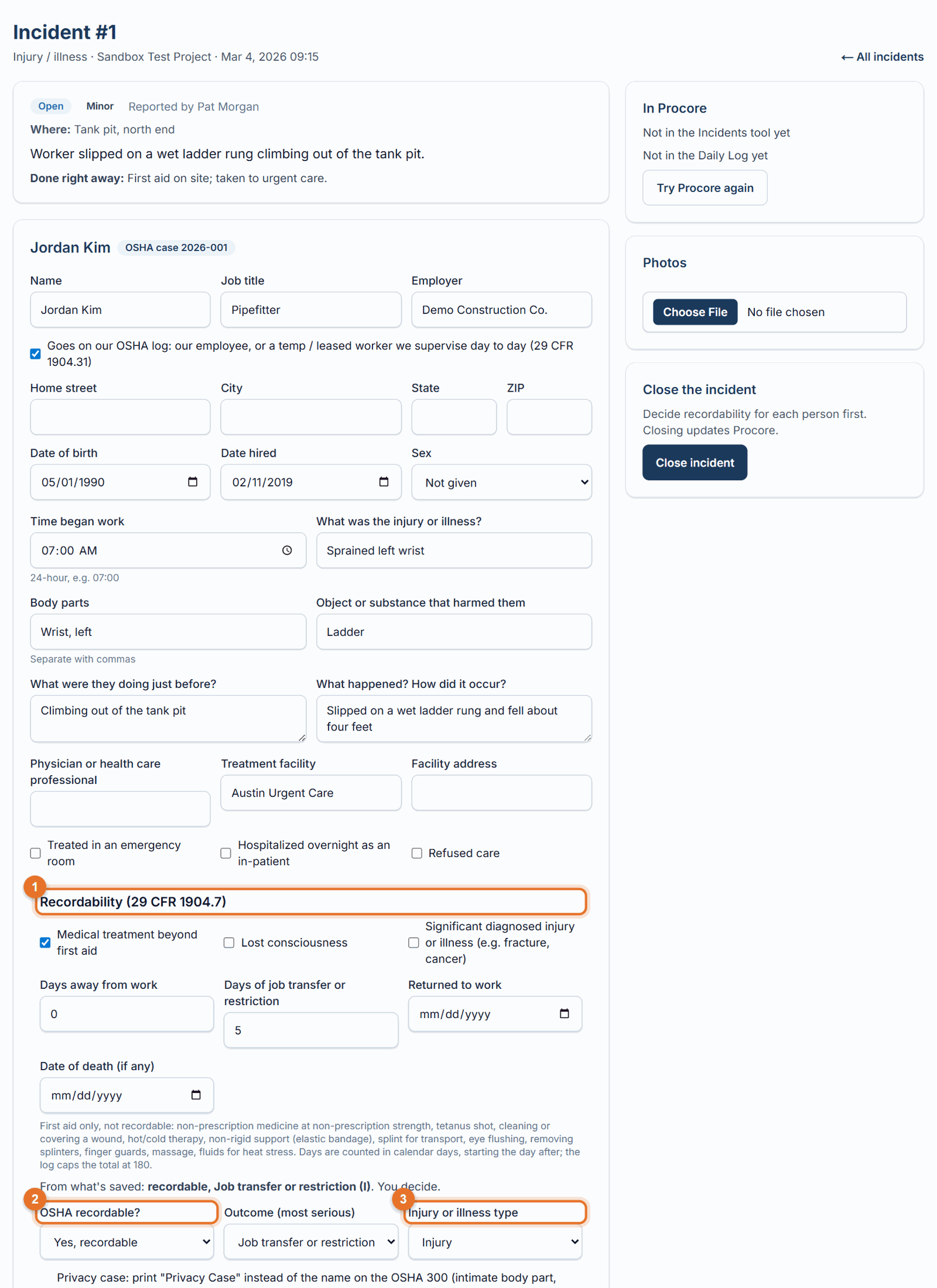
- When every person has a decision, add the root cause and corrective actions under Investigation and click Close incident.
Completed by: when you mark a case recordable and save, the Form 301 "Completed by" block (name, title, phone, date) is filled in with yours. Change it if someone else completed the report.
Severe injuries: report to OSHA directly
A fatality, an in-patient hospitalization, an amputation or the loss of an eye is reported to OSHA itself, separately from the logs (29 CFR 1904.39): a fatality within 8 hours, the others within 24 hours of learning about it. A death counts when it happens within 30 days of the incident; a hospitalization, amputation or eye loss when it happens within 24 hours of it.
- When a case shows one of these (a date of death, Hospitalized overnight as an in-patient, Amputation or Loss of an eye), LaunchPad Safety emails your Administrator and Safety team at once, marks the incident Report to OSHA, and shows the deadline on the case and on OSHA Logs. The clock starts when LaunchPad Safety learned of it.
- Decide whether it is reportable, then call OSHA at 1-800-321-6742, call or visit the nearest area office, or report at osha.gov/report.
- On the case, enter Reported to OSHA on and the OSHA reference number (or who took the report), and save.
Goes on our OSHA log: leave it ticked for your own employees and for temporary or leased workers you supervise day to day. Untick it for another company's employees; their employer records them.
First aid is not recordable: non-prescription medicine at non-prescription strength, a tetanus shot, cleaning or covering a wound, hot or cold therapy, an elastic bandage or other non-rigid support, a splint for transport, eye flushing, removing splinters, finger guards, massage, fluids for heat stress.
Privacy cases print "Privacy Case" instead of the name: injury to an intimate body part or the reproductive system, sexual assault, mental illness, HIV, hepatitis or tuberculosis, a needlestick with contaminated material, or when the employee asks.
Your OSHA Logs page
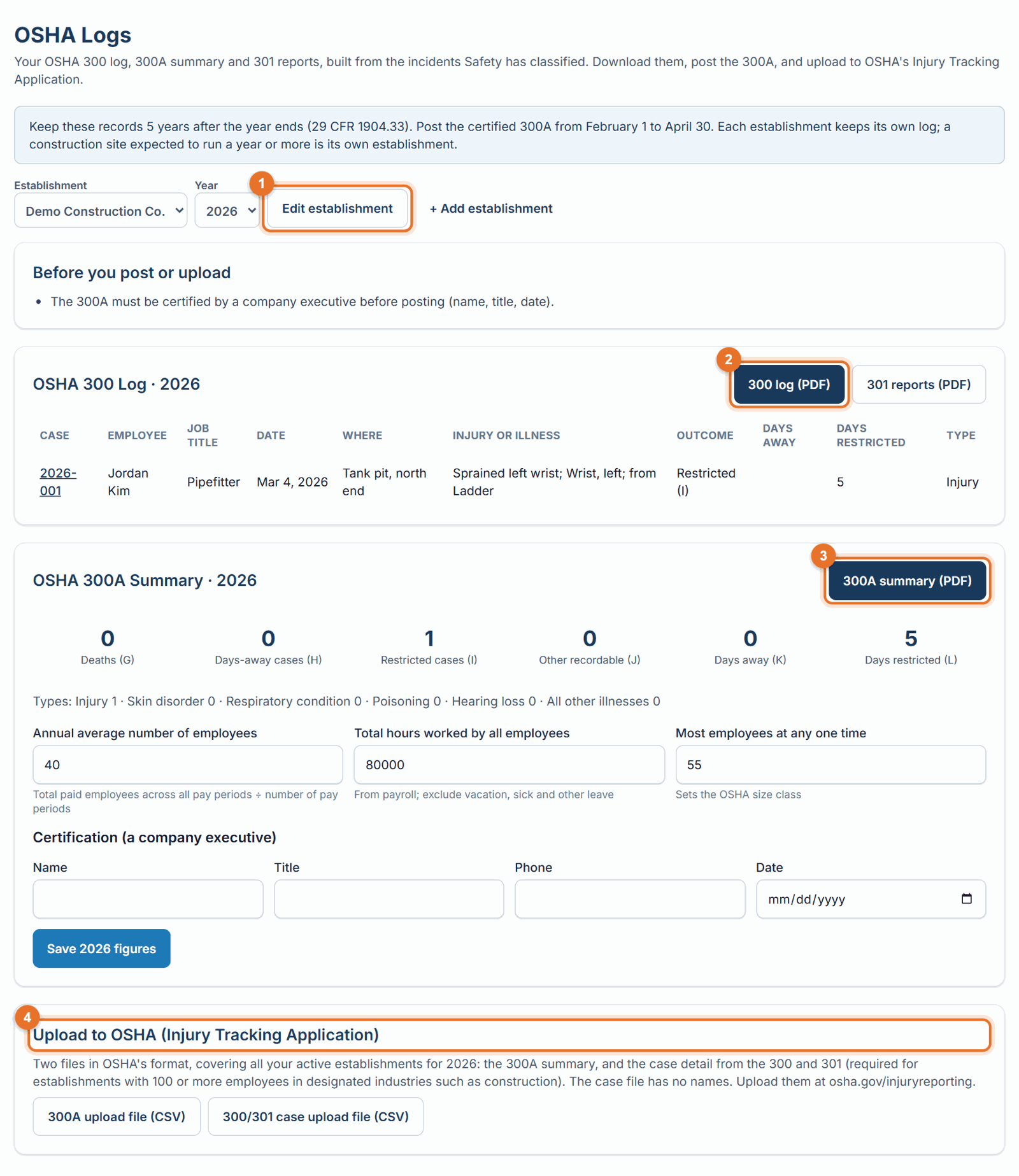
- Open OSHA Logs. Choose the Establishment and Year.
- Edit establishment once: street address (not a PO Box), city, state, ZIP, the 6-digit NAICS code, and the EIN (needed only for the OSHA upload). Your office is set up automatically; add an establishment for any job site expected to run a year or more.
- Fix anything listed under Before you post or upload.
- Enter the annual average number of employees, total hours worked, and the most employees at one time. Have a company executive certify (name, title, phone, date). Save.
-
Download what you need:
- 300 log (PDF): one row per recordable case. Days are capped at 180 in total.
- 301 reports (PDF): one per case.
- 300A summary (PDF): post it where employees can see it from February 1 to April 30 of the following year.
- 300A upload file and 300/301 case upload file (CSV): upload them at osha.gov/injuryreporting. The case file has no names.
If something goes wrong
- "Decide whether each injury is OSHA recordable before closing": open each person on the incident and choose Yes or No.
- "A recordable case needs its outcome": choose Death, Days away, Job transfer or restriction, or Other recordable.
- "Use the street address where the work is based, not a PO Box": OSHA rejects PO Box addresses.
- "Each establishment needs a unique name": OSHA matches uploads on the name, so keep it unique and the same every year.
Good to know
- Keep these records five years after the year they cover (1904.33). They're included in Download your company's records; download before a subscription ends.
- Injuries reported in Procore directly don't appear here; report them in LaunchPad Safety so they reach the OSHA log.