
Logs: every inspection, observation and toolbox talk, with filters and PDF export
Find any inspection, observation or toolbox talk across your jobs, filter and sort the list, and export it to PDF.
Logs (in the website menu) lists your safety work across your Procore jobs, read live from Procore: what was started in LaunchPad Safety, and the Safety-type inspections your teams start directly in Procore. Pick a log, filter and sort it, open any item, and export the list or a single record to PDF.
The logs
- Inspection log: date, job, number, inspection, status, number of deficient items, items answered, the
inspector, and Started in (LaunchPad Safety or Procore). Use the Inspections filter to switch between:
- Site safety inspections: your company's safety inspection template, and any Procore template named like a site safety inspection or audit, wherever it was started.
- Other safety inspections: every other Procore inspection of type Safety: equipment, vehicles, trailers, trenches, ladders, harnesses, lockout/tagout and so on. These are listed here; open them in Procore.
- Observation log: corrective actions with created date, job, number, title, priority, status, due date (with "overdue" when it's past due and not closed) and the assignee with their company.
- Toolbox talk & JSA log: every talk delivered and JSA reviewed in LaunchPad Safety (date, job, type, title, who led it, language, signatures "signed / attendees", and "✓ Recorded" or "Pending" in Procore), plus JSAs started directly in Procore ("Started in Procore"). If a recorded talk or JSA is deleted in Procore, its row says Deleted in Procore; the signed record is kept in LaunchPad Safety.
- People report: only for people the Administrator has given access; see People report.
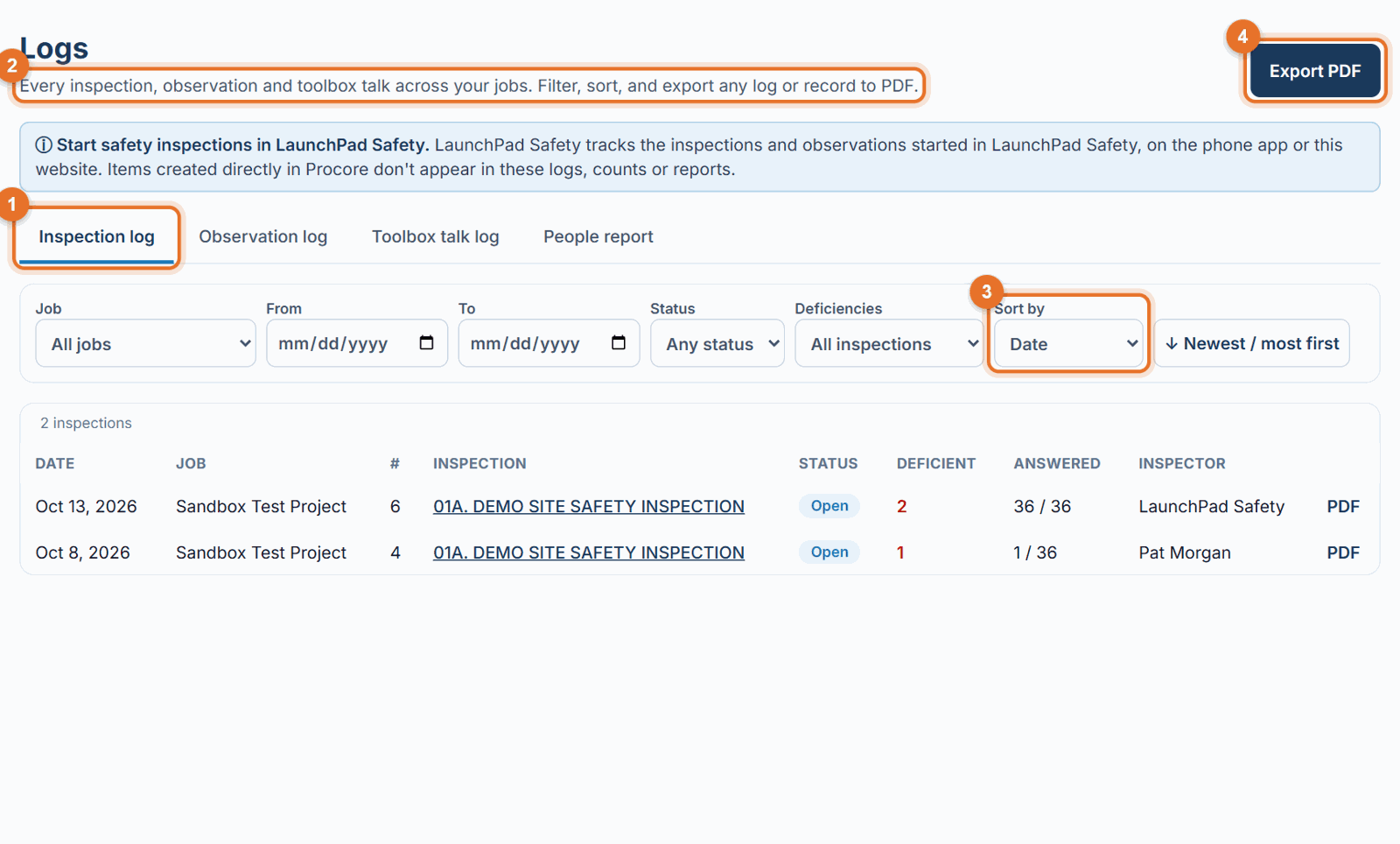
Filter and sort
- Choose the log tab.
-
Use the filters:
- Job: all jobs or one project.
- From / To: a date range.
- Status (inspections and observations) or Type (talks: toolbox talks or JSA reviews).
- Deficiencies (inspections): with or without deficiencies.
- Priority (observations): Urgent, High, Medium, Low, or Overdue only. 3. Sort by date, status, deficiencies, priority, due date or attendees (depending on the log), and flip the order with ↓ Newest / most first / ↑ Oldest / least first. 4. Clear filters resets them.
Open or export
- Click an inspection name to open it, or a talk title to open the talk in the library.
- PDF at the end of a row downloads that single inspection, observation or talk record.
- Export PDF at the top downloads the whole log as shown, with your filters, as a branded landscape PDF.
Edit or delete an observation
Safety and the Administrator see Edit and Delete under each row of the Observation log. Both change it in Procore too. See Corrective actions.
Good to know
- What counts as safety comes from Procore: each inspection template has an Inspection Type (Safety, Quality, Environmental, Commissioning). Only type Safety appears here. If a JSA or safety checklist is missing, check its type in Procore (Company Admin → Inspections → Templates) and set it to Safety.
- A template with "JSA", "JHA" or "AHA" (or "job safety / hazard analysis") in its name goes to the Toolbox talk & JSA log; everything else of type Safety goes to the Inspection log.
- Site safety inspections started in Procore can be opened, answered and reported in LaunchPad Safety like any other.
- Observations (corrective actions) created directly in Procore still don't appear; only those raised in LaunchPad Safety do.
- Toolbox talk and JSA record inspections are kept out of the Inspection log; they're in the Toolbox talk & JSA log.
- The logs read from Procore, so a large account can take a few seconds to load.
- Everyone signed in can see the logs. The People report needs separate access.
Still stuck? Call or text (888) 207-2330 or email support@launch-pad-core.com.