
The Dashboard and its PDF
Choose a Procore instance, read the leading indicators for each of its jobs, see who closes corrective actions, and export the dashboard to PDF.
The Dashboard (first item in the website menu) shows leading safety indicators for the jobs in one Procore instance at a time, read live from Procore.
Who can see it
Administrators, Safety Personnel, Project Administrators, Superintendents, Project Managers, Project Coordinators and Executives. Subcontractor users see the Procore connections only.
Choose the Procore instance first
When your company has more than one Procore instance connected (for example one for California and one for Texas), Procore instance at the top of the page sets what the whole page shows: - All instances: everything combined. The job table adds an Instance column. - One instance: only its jobs, and Safety Scores and Closures by role count only the work on them. Someone who works in two instances shows in each with only that instance's work.
The same choice applies on Safety Scores, and it's remembered on this computer. With one instance there is nothing to choose. See Several Procore instances.
The job table
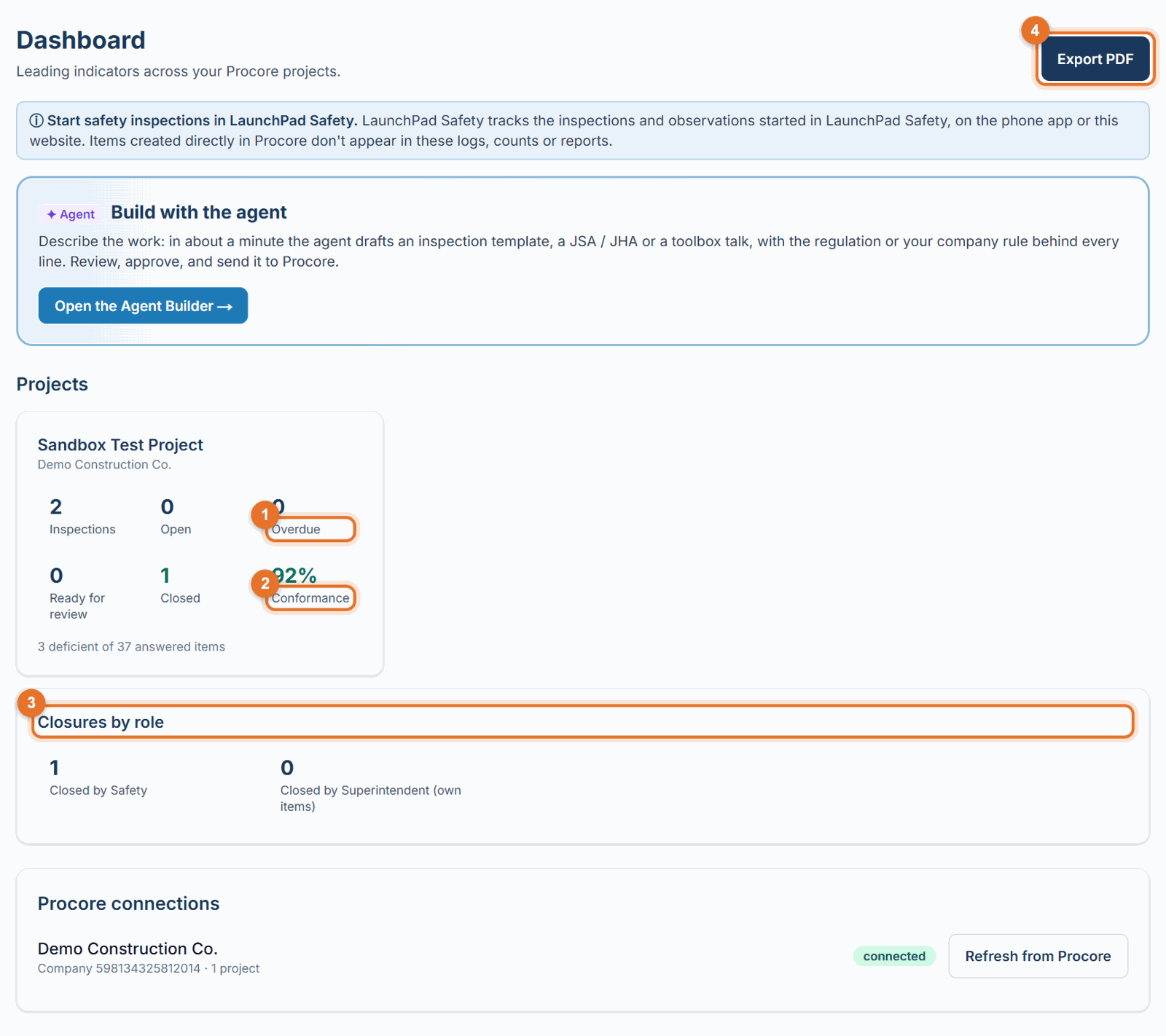
Type in Search jobs to find a job by name. Jobs with the most overdue items come first, then the most open ones. The table scrolls; its headings stay in place. Each column: - Inspections: site safety inspections on the project, started in LaunchPad Safety or directly in Procore. - Open: corrective actions not closed yet. - Overdue: open corrective actions past their due date. - Ready for review: corrective actions the assignee says are fixed, waiting for someone to check and close them. - Closed: corrective actions closed. - Conformance: the share of answered inspection items that were not deficient. Point at it to see the counts ("12 deficient of 240 answered items"). It shows in orange below 90%.
Count Procore-started safety work from
Administrators and Safety Personnel see a date box under the note at the top. Pick a date to leave out inspections, JSAs and other safety checks started directly in Procore before it, for example the old inspections from before your company used LaunchPad Safety. They drop out of the dashboard, Field and Logs, and stay in Procore. Work started in LaunchPad Safety always counts. Count everything clears the date.
Closures by role
- Closed by Safety and Closed by Superintendent (own items): how many corrective actions each closed under your company's closing rule (Settings → Who closes corrective actions). When the rule lets Project Managers close Low and Medium items, Closed by Project Manager (Low / Medium) appears too.
Procore connections
The bottom card lists each connected Procore company and how many projects it has. Administrators can click Refresh from Procore to read projects, hazard lists and types again, for example after giving the app access to a new project.
Export PDF
Click Export PDF for a landscape "Safety dashboard" report of the instance you chose: totals (inspections, conformance, open actions, overdue, ready for review, closed, talks / JSAs recorded), a table by job, and the closures by role, with your logo.
Good to know
- Site safety inspections are counted wherever they were started. Corrective actions are counted when they were raised in LaunchPad Safety. Quality, environmental and commissioning inspections never are.
- For the people behind the numbers, use the People report; for the item lists, use Logs.