
Install LaunchPad Safety in your Procore company
Install LaunchPad Safety as a custom app in your Procore company with the App Version Key, so it can work with your projects.
LaunchPad Safety works through an app installed in your own Procore company. Install it once per Procore company. LaunchPad Safety is not listed on the Procore App Marketplace yet, so you install it as a custom app with an App Version Key.
Before you start
- You need Admin rights on Procore's company-level Admin tool. If you don't have them, ask your Procore administrator to do these steps with you.
- In LaunchPad Safety you need to be the Administrator to see the App Version Key.
Steps
- Copy the App Version Key. In LaunchPad Safety, open Settings → Connect Procore and settings. Under 1. Install LaunchPad Safety in your Procore company, click Copy key.
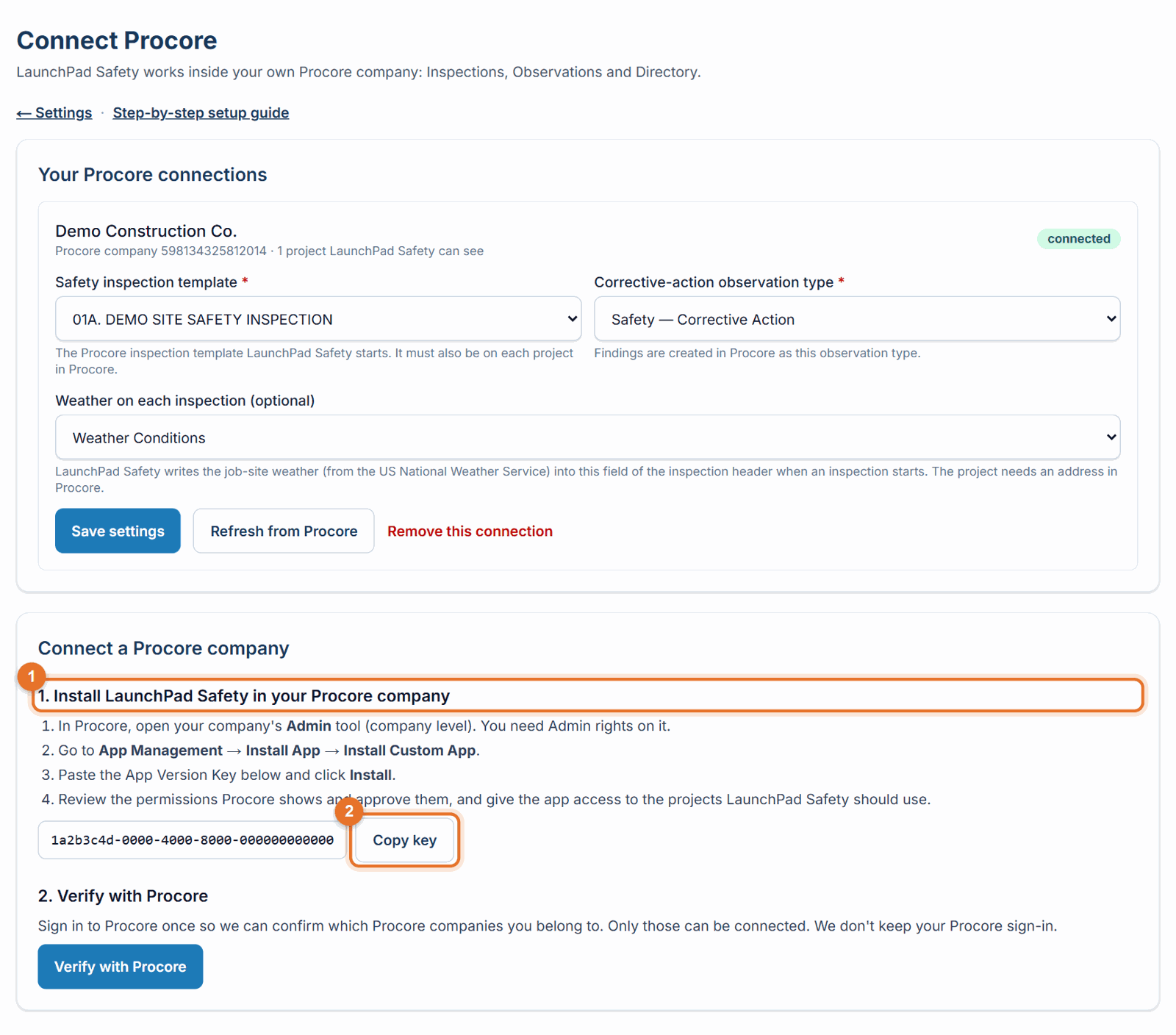
- Open Procore's company Admin tool. In Procore, go to your company (not a project) and open the Admin tool.
- Install the custom app. Go to App Management → Install App → Install Custom App. Paste the App Version Key and click Install.
- Approve the permissions. Procore shows what the app is allowed to do (Inspections, Observations and the project Directory). Review them and approve.
- Give the app its projects. Give the app access to the projects LaunchPad Safety should use. See Choose which Procore projects LaunchPad Safety can see.
- Come back to LaunchPad Safety and connect the company. See Connect your Procore company.
If something goes wrong
- "The install key isn't set up on this server yet." Call (888) 207-2330 or email support@launch-pad-core.com and we'll send you the key.
- You don't see App Management or Install Custom App. Your Procore sign-in doesn't have Admin rights on the company Admin tool. Ask your Procore administrator.
- Later, LaunchPad Safety says the app is not installed. See Fix Procore connection problems.
Good to know
- The app uses its own service account in Procore, which you approve when you install it. Inspections and observations created by LaunchPad Safety may show that account in Procore as the creator; LaunchPad Safety keeps track of who really did it.
- Installing the app doesn't change anything in your Procore by itself. LaunchPad Safety only creates the inspections and corrective actions your team starts in it.
Still stuck? Call or text (888) 207-2330 or email support@launch-pad-core.com.